
Supreme NiuNiu Withdrawal Guide and Operation Steps
The Supreme NiuNiu withdrawal page is used to request the transfer of qualifying withdrawable balance, and the current default receiving method is displayed as Touch 'n Go eWallet. The page shows a minimum withdrawal of RM100 and provides quick amounts of RM100, RM200, RM500, RM1,000, RM2,000, and RM5,000. Before submitting a Supreme NiuNiu withdrawal, users should first confirm the receiving account, withdrawable balance, remaining free withdrawal count for the day, and fee notice, then complete the application according to the page status.
Supreme NiuNiu Withdrawal Steps
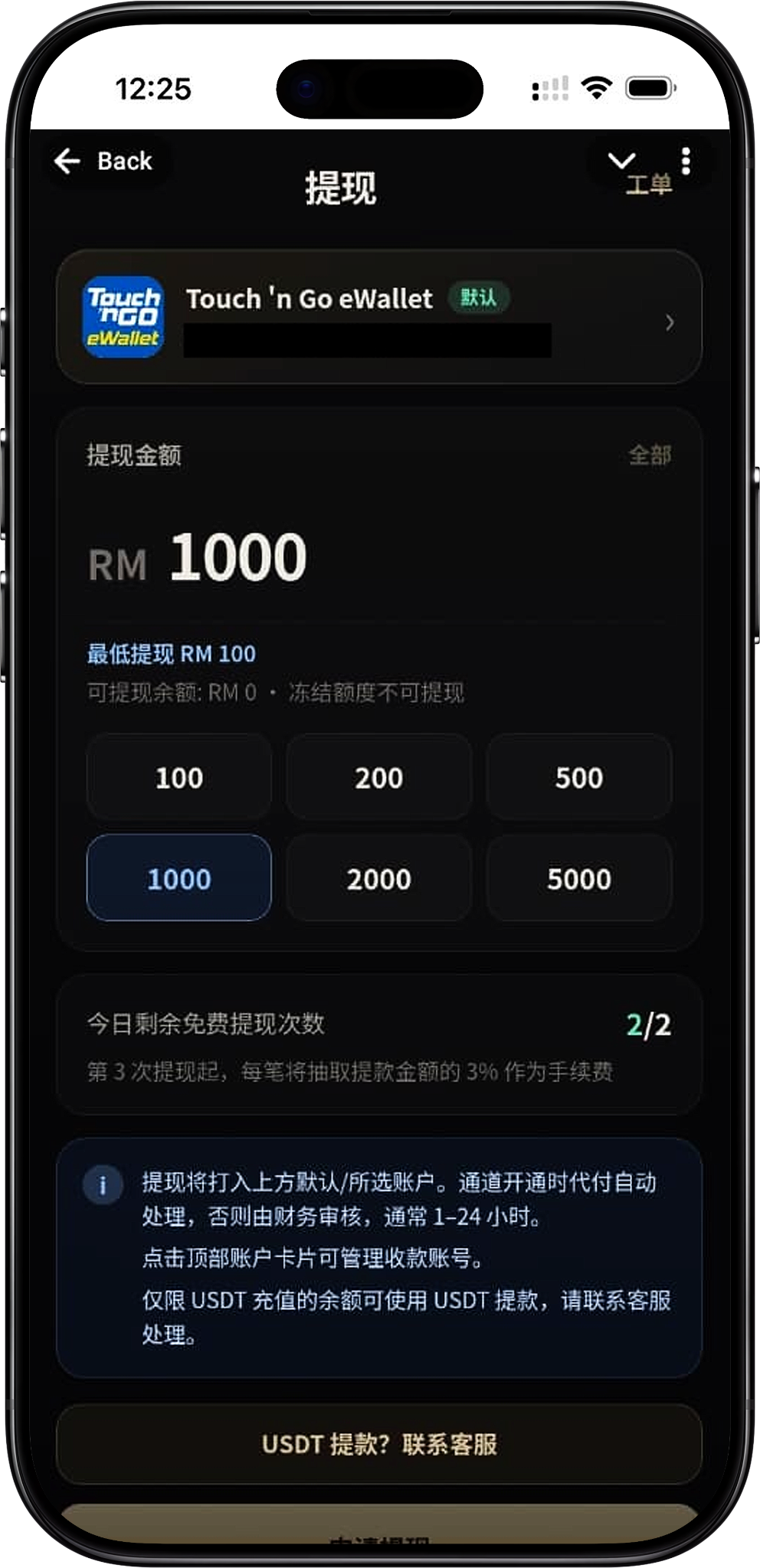
Step 1: Enter the withdrawal page
After logging in to the account, enter the Supreme NiuNiu withdrawal page and first check the default receiving method and account information displayed at the top. The current screenshot shows the receiving method as Touch 'n Go eWallet.
Step 2: Confirm the receiving account
The top of the withdrawal page will display the current receiving account card. Before submitting the application, you should confirm that the displayed Touch 'n Go eWallet receiving information belongs to the account you need to use. The page also prompts that you can click the top account card to manage the receiving account.
Step 3: Confirm the withdrawable balance
Check the withdrawable balance displayed on the page before entering the withdrawal amount. The system clearly states that frozen amounts cannot be withdrawn, so the total account balance and the current actually withdrawable amount may differ, and the withdrawable balance displayed on the withdrawal page shall prevail.
Step 4: Enter or select the withdrawal amount
Enter the amount you need to apply for in the "Withdrawal Amount" area, or use the quick options of RM100, RM200, RM500, RM1,000, RM2,000, and RM5,000 provided on the page. The current page shows a minimum withdrawal of RM100, and the actual applicable amount shall not exceed the withdrawable balance at that time.
Step 5: Check the free withdrawal count and fees
Before submitting, check the "Remaining Free Withdrawals Today." The current screenshot example shows 2/2, and the page also states that starting from the 3rd withdrawal, 3% of the withdrawal amount will be charged as a fee for each transaction. The actual remaining count and fee status shall be subject to what is displayed on the page on the day of application.
Step 6: Click Apply for Withdrawal
After confirming the receiving account, withdrawal amount, and related fee notices, click "Apply for Withdrawal" to submit. If the receiving account has instant payout enabled, the page states that the withdrawal will be processed automatically; otherwise, it will enter the finance review process.
Step 7: View the withdrawal ticket
A "Ticket" entry is provided at the top right of the withdrawal page, which can be used to view related withdrawal records or processing status. After submission, if you need to confirm the current progress, you can view it through the ticket feature provided on the page.
Touch 'n Go eWallet Withdrawal
Default receiving method
The current Supreme NiuNiu withdrawal page displays Touch 'n Go eWallet as the default receiving method. The receiving information will be displayed at the top of the page, and users should verify the account before applying to avoid affecting withdrawal processing due to incorrect receiving information.
Manage the receiving account
The page prompts that you can click the top account card to manage the receiving account. If you need to check the currently bound receiving information, you should first enter that account card to confirm, then return to the withdrawal page to submit the application.
Use a confirmed receiving account
When submitting a Touch 'n Go eWallet withdrawal, you should use the receiving account currently displayed and confirmed on the page. The existing materials do not provide the complete operation steps for adding or modifying a receiving account, so the specific account management method shall be subject to the platform's actual page instructions.
Withdrawal Amount and Withdrawable Balance
Minimum withdrawal RM100
The current withdrawal page clearly displays a minimum withdrawal amount of RM100. Users can directly select a quick amount starting from RM100 or enter a withdrawal amount according to the input methods allowed on the page.
Quick withdrawal amounts
The page currently provides six quick amounts: RM100, RM200, RM500, RM1,000, RM2,000, and RM5,000. After selecting a quick amount, you should still confirm that the account has sufficient withdrawable balance.
Withdrawable balance
The withdrawal page separately displays the "Withdrawable Balance." The submitted amount should be based on this value rather than referring only to other balances displayed in the account.
Frozen amounts cannot be withdrawn
The page clearly states that "frozen amounts cannot be withdrawn." If part of the funds is in a frozen state, that portion will not be counted toward the amount currently available for withdrawal application, and the system's actual display shall prevail.
Free Withdrawal Count and Fees
Daily free withdrawal count
The withdrawal page will display the "Remaining Free Withdrawals Today," allowing users to confirm how many free withdrawal opportunities remain for the day before applying. The 2/2 in the screenshot belongs to the account status at that time and does not mean that all times will display the same fixed count.
Fees are charged starting from the 3rd withdrawal
According to the current page rules, starting from the 3rd withdrawal, 3% of the withdrawal amount will be charged as a fee for each transaction. Therefore, when making multiple withdrawals on the same day, you should check the remaining free withdrawal count and the fee rules displayed on the page at that time before submitting.
Fee example
For example, if the rules shown on the page remain unchanged, and a certain RM1,000 withdrawal is the 3rd or later withdrawal of the day, the fee calculated at 3% would be RM30. The actual deduction result shall still be subject to what the system displays when the withdrawal is submitted and the final processing result.
Withdrawal Crediting and Review Handling
Automatic processing after instant payout is enabled
The page states that the withdrawal will be credited to the default or selected account above. If the channel has instant payout enabled, the application will be processed automatically. The specific crediting time may still be affected by the actual payment processing status.
Finance review if instant payout is not enabled
If the relevant channel does not have instant payout enabled, the withdrawal application will be reviewed by finance. The reference processing time provided on the page is usually 1–24 hours, so after submission, the actual processing progress should be checked through the ticket or account status.
Check withdrawal information before submitting
To reduce the impact on processing due to information or amount issues, you should re-verify the receiving account, withdrawal amount, withdrawable balance, and fee status before applying. If the withdrawal status is abnormal, you can further inquire through the customer service or ticket entries provided by the platform.
USDT Withdrawal Explanation
Withdrawal restriction for USDT top-up balance
The current page clearly states that only balances topped up with USDT can be withdrawn using USDT. The existing materials do not show that ordinary balances can be directly converted to USDT withdrawals, so the two withdrawal methods should not be confused.
USDT withdrawal requires contacting customer service
The page provides a "USDT withdrawal? Contact customer service" entry. Since the current materials do not provide the USDT network, wallet address entry, or other complete operation processes, if you need to use USDT withdrawal, you should confirm the specific processing requirements through the customer service entry provided on the page.
Supreme NiuNiu Withdrawal FAQ
What is the minimum withdrawal amount for Supreme NiuNiu?
The current withdrawal page shows a minimum withdrawal amount of RM100. If the actual minimum amount is adjusted, it shall be subject to what is displayed on the page when the application is submitted.
Does Supreme NiuNiu withdrawal support Touch 'n Go eWallet?
Yes. The current screenshot shows Touch 'n Go eWallet as the default receiving method and displays the corresponding receiving account information at the top of the page.
How many free withdrawals are there per day?
The page will display the remaining free withdrawal count for the day. The current screenshot example is 2/2 and states that fees begin from the 3rd withdrawal, so the remaining count displayed on the account page for that day shall prevail.
What is the Supreme NiuNiu withdrawal fee?
According to the current page rules, starting from the 3rd withdrawal of the day, 3% of the withdrawal amount is charged as a fee for each transaction. The specific fee shall be subject to the rules displayed by the system when the withdrawal is applied for.
Why can't I withdraw the full balance even though there is a balance?
The page distinguishes between withdrawable balance and frozen amounts and clearly states that frozen amounts cannot be withdrawn. Therefore, even when the account has a balance, the actual applicable withdrawal amount shall still be subject to the data displayed as "Withdrawable Balance."
How long does Supreme NiuNiu withdrawal take to be credited?
The page states that channels with instant payout enabled are processed automatically; those without instant payout enabled are reviewed by finance, usually within 1–24 hours. The actual crediting time shall be subject to the processing status of the corresponding withdrawal application.
How do I check the withdrawal status?
A "Ticket" entry is provided at the top right of the withdrawal page. After submitting the application, you can view withdrawal-related records or processing status through this entry.
Can I withdraw using USDT?
The page states that only balances topped up with USDT can be withdrawn using USDT and requires handling through customer service contact. The specific withdrawal network and operation requirements should be confirmed with platform customer service before applying.
Apply for a Supreme NiuNiu Withdrawal
Enter the withdrawal page to verify the receiving account and withdrawable balance, confirm the day's free withdrawal count and fee status, then select the amount and submit the withdrawal application.