
Supreme NiuNiu Top-Up Guide and Operation Steps
The Supreme NiuNiu top-up page provides two top-up methods, VPay and SecurePay, and depending on the selected method, you can use payment channels such as P2P online banking transfer, DuitNow, Touch 'n Go, FPX, or e-wallets. The current page shows a minimum top-up of RM100 and provides quick amounts of RM100, RM200, RM500, RM1,000, RM2,000, and RM5,000. After completing payment, top-ups that meet the process are automatically credited. The actual available methods, amount limits, and payment status shall be subject to what is displayed in real time on the top-up page.
Supreme NiuNiu Top-Up Steps
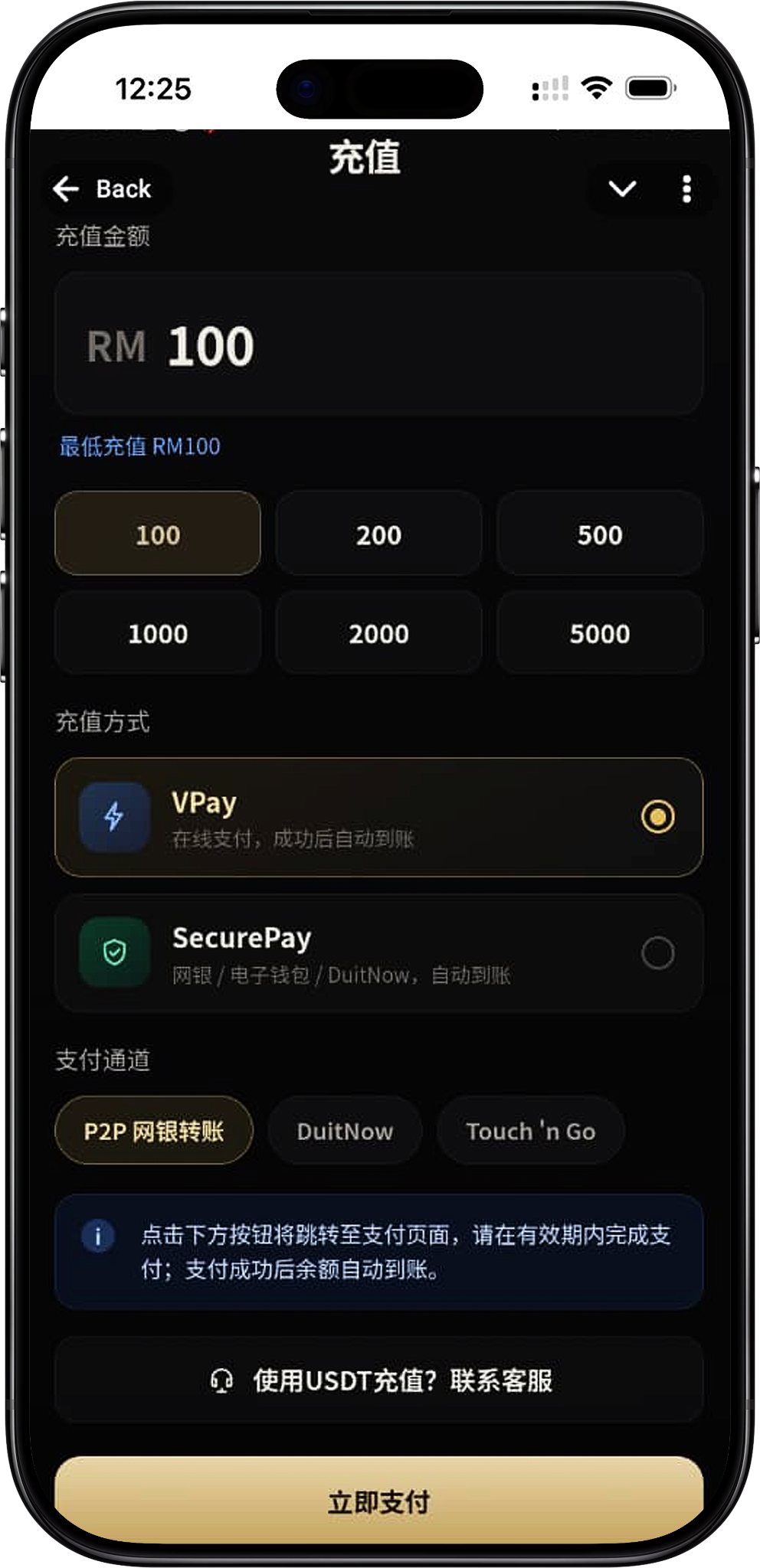
Step 1: Enter the top-up page
After logging in, enter the Supreme NiuNiu top-up page and first confirm the minimum top-up amount and available payment methods displayed on the current page.
Step 2: Enter or select the top-up amount
Enter the amount you need to top up in the "Top-Up Amount" field, or directly select a quick amount provided on the page. The current screenshot shows a minimum top-up of RM100 and provides options of RM100, RM200, RM500, RM1,000, RM2,000, and RM5,000; some page states also show a single-transaction upper limit of RM50,000, and the final limit shall be subject to the actual top-up page.
Step 3: Select the top-up method
The page currently provides VPay and SecurePay. VPay is marked as online payment with automatic crediting after success; SecurePay supports online banking, e-wallets, and DuitNow, and is likewise marked as automatic crediting. After selecting the method, continue operating according to the payment channels provided on the page.
Step 4: Select the payment channel
When using VPay, the page allows you to select P2P online banking transfer, DuitNow, or Touch 'n Go. When using SecurePay, the payment page allows you to further select FPX, E-Wallet, or DuitNow. The actual options that appear may vary depending on the payment page for that instance.
Step 5: Click Pay Now
After confirming the amount, top-up method, and payment channel, click "Pay Now." The system will redirect to the corresponding third-party payment page. Please complete the payment according to the page instructions and pay attention to the validity time displayed on the payment page.
Step 6: Complete payment and confirm crediting
After successful payment, the top-up page indicates that the balance will be automatically credited. After completing payment, you can return to the account to confirm the balance status; if the payment was not completed or the current payment was cancelled, you can reselect the amount and payment method according to the page prompts.
VPay Top-Up Method
VPay online payment
VPay is one of the online payment methods currently provided on the Supreme NiuNiu top-up page, and the page marks it as "Online payment, automatically credited after success." After selecting VPay, you can continue to select P2P online banking transfer, DuitNow, or Touch 'n Go according to what is displayed on the page.
VPay P2P online banking transfer
After selecting VPay, you can use the P2P online banking transfer channel. After entering the payment page, select your bank from the bank options provided by the system and complete the transaction according to the bank and payment page requirements.
VPay DuitNow
After selecting DuitNow under VPay and clicking "Pay Now," the system will enter the corresponding payment page. The DuitNow page shown in the screenshot provides a payment QR code and displays the top-up amount, and also has a QR code validity countdown, so payment should be completed within the time specified on the page.
VPay Touch 'n Go
After selecting Touch 'n Go, the payment page will display the corresponding amount and QR code. The page instructs users to scan the QR code through the Scan function of Touch 'n Go eWallet and complete the payment, and also requires the transaction to be completed within the specified time.
SecurePay Top-Up Method
SecurePay automatic crediting
SecurePay is another top-up method provided on the page. The current description states that it supports online banking, e-wallets, and DuitNow and marks automatic crediting after successful payment. After selecting SecurePay and clicking "Pay Now," you can enter the SecurePay checkout to select the specific payment channel.
SecurePay FPX
After selecting FPX at the SecurePay checkout, you can select the corresponding bank from the bank list and then continue payment according to the page process. The bank options shall be subject to the actual list provided by SecurePay at that time.
SecurePay E-Wallet
SecurePay also provides an E-Wallet option. The current screenshot shows that Boost, GrabPay, ShopeePay, and Touch N Go can be selected. After selecting the corresponding e-wallet, complete the payment according to the checkout instructions.
SecurePay DuitNow
The SecurePay checkout also provides DuitNow Instant Transfer. After selecting DuitNow, you need to confirm the related terms according to the page requirements before continuing to submit the payment.
FPX Bank Top-Up
Select a bank through FPX
FPX is suitable for completing top-ups through supported online banking. After entering the FPX payment page, you should select your bank from the Select Bank list and then complete authorization and payment according to the corresponding bank page.
FPX banks displayed on the VPay page
The current VPay FPX screenshot shows bank options such as Maybank, CIMB, Hong Leong Bank, RHB, Public Bank, BSN, AmBank, Bank Islam, and Affin. The specific supported banks shall be subject to what is displayed on the payment page at that time.
FPX banks displayed on the SecurePay page
The current SecurePay FPX list screenshot shows Affin Bank, Alliance Bank (Personal), AGRONet, AmBank, Bank Islam, Bank Muamalat, Bank Rakyat, Bank Of China, BSN, CIMB Clicks, Hong Leong Bank, HSBC Bank, KFH, Maybank2E, Maybank2U, OCBC Bank, Public Bank, RHB Bank, Standard Chartered, and UOB Bank. Since the bank list may be adjusted by the payment service page, the actual available banks shall be subject to the Select Bank list at the time of payment.
Complete payment according to the bank page
After selecting a bank, you should complete the transaction according to the steps on the bank or payment service page. The VPay FPX page also reminds users to ensure that the bank account has sufficient balance and to prepare the online banking username, password, and any OTP or transaction approval method the bank may require.
E-Wallet and DuitNow Top-Up
Touch 'n Go eWallet
Touch 'n Go can be used through the payment channel provided on the page. The current VPay process will generate a payment QR code with the amount and validity time, and users need to use Touch 'n Go eWallet to scan the QR code and complete payment within the specified time.
SecurePay E-Wallet
After selecting E-Wallet through SecurePay, the current page provides Boost, GrabPay, ShopeePay, and Touch N Go. After selecting the e-wallet you need to use, continue operating according to the corresponding payment page.
DuitNow
DuitNow can be used as a payment channel in the current top-up process. Both the VPay and SecurePay pages display DuitNow-related options, but the actual payment form will differ depending on the selected payment service, so the transaction should be completed according to the instructions on the redirected page.
USDT top-up notice
The Supreme NiuNiu top-up page also displays an entry for "Using USDT to top up? Contact customer service." The existing page materials do not provide the specific USDT address, network, or top-up steps, so if you need to use this method, you should confirm through the customer service entry provided on the page rather than transferring on your own to an unconfirmed address.
Top-Up Amount and Payment Notes
Confirm the minimum top-up amount
The current top-up page shows a minimum top-up amount of RM100. Some screenshots also show a single-transaction upper limit of RM50,000. Since amount limits may be displayed according to the current top-up method or page configuration, the minimum and maximum amounts on the page should be confirmed again before submitting payment.
Complete payment within the validity time
Some third-party payment pages have a countdown. For example, the QR code payment page in the screenshot will display the remaining validity time. After generating a payment order, the transaction should be completed within the time specified on the page; if the order or QR code has expired, return to the top-up page and operate again.
Do not double-pay a cancelled order
When the top-up page displays "The current payment has been cancelled, you can now reselect the amount," you should re-establish the payment process according to the page prompts rather than continuing to use the cancelled or expired payment page.
Verify the amount and payment page
After redirecting to the third-party payment page, you should first verify whether the displayed top-up amount matches the submitted amount, then complete payment according to the bank, FPX, DuitNow, or e-wallet page. Do not submit payment information on unconfirmed pages.
Check the account balance after payment is completed
Both VPay and SecurePay currently indicate automatic crediting after success. After completing payment, you can return to the Supreme NiuNiu account to check whether the balance has been updated; if an abnormality occurs, you should keep the relevant payment records and inquire through the customer service channels provided by the platform.
Supreme NiuNiu Top-Up FAQ
What is the minimum top-up amount for Supreme NiuNiu?
The current screenshot shows that the minimum top-up amount for Supreme NiuNiu is RM100. The actual minimum amount shall be subject to what is displayed on the page when making the top-up.
What methods does Supreme NiuNiu top-up support?
The current page provides VPay and SecurePay. Depending on the selected payment service, you can also use P2P online banking transfer, FPX, DuitNow, Touch 'n Go, and other e-wallet channels displayed on the page.
Can I use FPX to top up Supreme NiuNiu?
Yes. The current payment process displays an FPX bank selection feature, and you can select the corresponding bank from the bank list provided on the payment page and continue to complete the payment.
Does Supreme NiuNiu support Touch 'n Go?
The current page displays the Touch 'n Go payment channel. The VPay process can generate a Touch 'n Go eWallet payment QR code, and Touch N Go is also displayed in the SecurePay E-Wallet list.
Which e-wallets does SecurePay support?
According to the current screenshot, the SecurePay E-Wallet list includes Boost, GrabPay, ShopeePay, and Touch N Go. The specific available options shall be subject to what is displayed on the SecurePay page at the time of payment.
Do I need to submit manually after a successful top-up?
The current top-up page marks both VPay and SecurePay as automatically credited after success. After completing the third-party payment, you can return to the account to check the balance status.
What should I do if the payment QR code expires?
The QR code payment page has a validity time. If the QR code or order has expired, you should not continue to pay that order; you should return to the top-up page, reselect the amount and payment method, and generate a new payment process.
Can I use USDT to top up?
The page displays "Using USDT to top up? Contact customer service," but the existing materials do not provide the specific USDT top-up steps. Therefore, if you need to use USDT, you should first confirm the currently supported methods and requirements through official customer service.
Start Your Supreme NiuNiu Top-Up
Enter the top-up page to confirm the amount, select VPay or SecurePay and the currently available payment channel, and complete the transaction according to the payment page instructions.